


Jsp servlet验证码工具类分享
昨晚在csdn看到一位前辈写一个ajax+servlet+jsp验证,顿时心血来潮,在阅读前辈的代码下我亲手体验一下,做了一个验证码生成工具类,以供大家做个参考。
1、添加veriycodeutils类生成验证码图像
package com.servlet;

import java.awt.color;
import java.awt.font;
import java.awt.graphics2d;
import java.awt.image.bufferedimage;
import java.io.outputstream;
import java.util.random;

import javax.imageio.imageio;

/**
 *
 * @author hubiao
 *  验证码生成器
 * 用到api
 *  bufferedimage 创建一个图像
 *  graphics2d 绘制
 *   fillrect(x,y,width,height);背景
 *   font()字体
 *   drawrect();边框
 *   drawline();线
 *   drwastring:图像数据
 *  imageio 生成图像
 */
public class veriycodeutils {
 /**
  * @param output 保存验证图像的流
  * @return 验证码
  */
 public static string newveriycode(outputstream output)
 {
  int width = 90;
  int height = 40;
  int codecount = 5;
  char[] codesequence = { 'a', 'b', 'c', 'd', 'e', 'f', 'g', 'h', 'i', 'j',
    'k', 'l', 'm', 'n', 'o', 'p', 'q', 'r', 's', 't', 'u', 'v', 'w',
    'x', 'y', 'z', '0', '1', '2', '3', '4', '5', '6', '7', '8', '9' };

  //创建图像对象,8位rgb
  bufferedimage buffered = new bufferedimage(width, height, bufferedimage.type_int_rgb);

  //通过crapahices来绘制图像到bufferedimage中
  graphics2d gra = buffered.creategraphics();

  //设置图片背景:白色
  gra.setcolor(color.white);
  gra.fillrect(0, 0, width, height);

  //设置字体,字体大小根据图片高度决定
  gra.setfont(new font("fixedsys",font.plain,height-2));

  //设置边框:黑色,1cm
  gra.setcolor(color.black);
  gra.drawrect(0, 0, width-1, height-1);

  //生成10条黑色干扰线
  gra.setcolor(color.black);
  random ran = new random();
  for(int i = 0; i < 70;i++)
  {
   int x = ran.nextint(255);
   int y = ran.nextint(255);
   int x1 = ran.nextint(255);
   int y1 = ran.nextint(255);
   gra.drawline(x, y,x+x1, y+y1);//画直线
  }
  //生成验证码
  stringbuffer sb = new stringbuffer();
  int r = 0,g = 0,b = 0;
  for(int i = 0; i < codecount; i++)
  {
   string strrand = string.valueof(codesequence[ran.nextint(codesequence.length)]);
   //对每位验证码都生成不同的颜色,增加识别系统难度
   r = ran.nextint(255);
   g = ran.nextint(255);
   b = ran.nextint(255);
   gra.setcolor(new color(r, g, b));
   gra.drawstring(strrand, (i+1)*13, height-4);
   sb.append(strrand);
  }
  try {
   imageio.write(buffered, "jpeg", output);
  } catch (exception e) {
   throw new runtimeexception(e);
  }

  return sb.tostring();
 }
}
2、servlet使用验证码
protected void dopost(httpservletrequest req, httpservletresponse resp)
   throws servletexception, ioexception {
  //禁止图像缓存
  resp.setheader("pragma", "no-cache");
  resp.setheader("cache-control", "no-cache");
  resp.setdateheader("expires", 0);
  resp.setcontenttype("image/jpeg");

  //生成验证码图像
  string veriycode = veriycodeutils.newveriycode(resp.getoutputstream());

  //将验证码保存到session中
  httpsession session = req.getsession();
  session.setattribute("validatecode", veriycode);
 }
3、jsp页面使用验证码
</head>
 <script type="text/javascript">
  function createcode()
  {
   var t = new date().gettime();//防止页面缓存,使用时间搓
   var srcimg = document.getelementbyid("srcimg");
   srcimg.src="/imgveifyweb/vity.do?"+t;
  }
 </script>
 <body>
 <h1>${requestscope.code}</h1>
 <img id="srcimg" src="<c:url value="/vity.do"></c:url>" /> #这里使用直接让img访问servlet,通过response响应一个图像流
 <a href="##" rel="external nofollow" id="codeid" onclick="createcode()">换一张</a>
 <form action="<c:url value="/hello.do"></c:url>" method="post">
  <input type="text" name="codevify"/>
  <input type="submit" value="提交"/>
 </form>
 </body>
4、校验验证码
protected void dopost(httpservletrequest req, httpservletresponse resp)
   throws servletexception, ioexception {
  httpsession session = req.getsession();
  object validatecode = session.getattribute("validatecode");
  system.out.println(validatecode);

  string codevify = req.getparameter("codevify");
  if(codevify==null || codevify.equals(""))
  {
   req.setattribute("code","验证证不能为空");
   req.getrequestdispatcher("/index.jsp").forward(req, resp);
   return;
  }else if(!validatecode.tostring().equalsignorecase(codevify))
  {
   req.setattribute("code","验证证错误");
   req.getrequestdispatcher("/index.jsp").forward(req, resp);
   return;
  }
  system.out.println("下面开始 做其他业务操作....");
 }
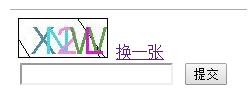
校验图如下:
以上就是本文的全部内容,希望对大家的学习有所帮助,也希望大家多多支持硕编程。
相关文章
- jsp+servlet实现文件上传与下载功能
- EJB3.0部署消息驱动Bean抛javax.naming.NameNotFoundException异常
- 在JSP中使用formatNumber控制要显示的小数位数方法
- 秒杀系统Web层设计的实现方法
- 将properties文件的配置设置为整个Web应用的全局变量实现方法
- JSP使用过滤器防止Xss漏洞
- 在JSP页面中动态生成图片验证码的方法实例
- 详解JSP 内置对象request常见用法
- 使用IDEA编写jsp时EL表达式不起作用的问题及解决方法
- jsp实现局部刷新页面、异步加载页面的方法
- Jsp中request的3个基础实践
- JavaServlet的文件上传和下载实现方法
- JSP页面的静态包含和动态包含使用方法
 JSP技巧
JSP技巧