


JSP实现简单人事管理系统
本文实例为大家分享了jsp实现简单人事管理系统的具体代码,供大家参考,具体内容如下
此系统使用jsp实现,其中包含了jsp九大内置对象和四大作用域的相关知识,采用map集合模拟数据库的方式,实现用户登录、员工信息展示、员工信息修改功能。
jsp的九大内置对象:application,config,exception,out,pagecontent,page,request,respsonse,sesstion
jsp的四大作用域:application sesstion page request
项目结构
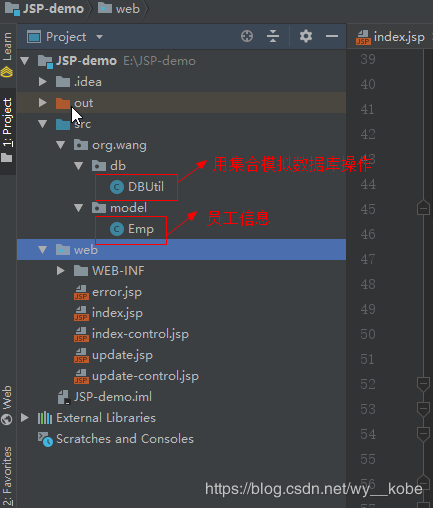
emp.java 员工信息
package org.wang.model;

public class emp {
 private string account;
 private string name;
 private string password;
 private string email;

 public emp(string account, string name, string password, string email) {
 this.account = account;
 this.name = name;
 this.password = password;
 this.email = email;
 }

 public string getaccount() {
 return account;
 }

 public void setaccount(string account) {
 this.account = account;
 }

 public string getname() {
 return name;
 }

 public void setname(string name) {
 this.name = name;
 }

 public string getpassword() {
 return password;
 }

 public void setpassword(string password) {
 this.password = password;
 }

 public string getemail() {
 return email;
 }

 public void setemail(string email) {
 this.email = email;
 }
}
dbutil.java 用集合模拟数据库存放员工信息
package org.wang.db;

import org.wang.model.emp;
import java.util.hashmap;
import java.util.map;

//用集合模拟操纵数据库
public class dbutil{
 public static map<string, emp> map = new hashmap<string, emp>();
 //用静态代码块完成对map中的值的初始化操作
 static {
 map.put("001",new emp("001","zhangsan","111111","111111@qq.com"));
 map.put("002",new emp("002","lisi","121212","121212@qq.com"));
 map.put("003",new emp("003","wangwu","131313","131313@qq.com"));
 map.put("004",new emp("004","zhaoliu","141414","141414@qq.com"));
 }

 //判断用户名和密码是否正确
 public static boolean selectempbyaccountandpassword(emp emp){
 //用户输入的信息存入到emp对象中,判断emp对象中的值是否和map中的值对应
 boolean flag = false;
 //遍历当前map集合中的key
 for (string key : map.keyset()){
 emp e = map.get(key);
 //判断用户传入的值是否与map集合中的值相等
 if(emp.getaccount().equals(e.getaccount()) && emp.getpassword().equals(e.getpassword())){
 flag = true;
 break;
 }
 }
 return flag;
 }
}
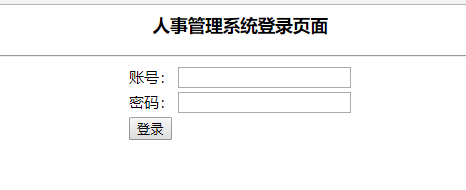
index.jsp 登录界面
<%--
 created by intellij idea.
 user: wangy
 date: 2018/11/8
 time: 8:19
 to change this template use file | settings | file templates.
--%>
<%@ page contenttype="text/html;charset=utf-8" language="java" %>
<html>
 <head>
 <title>人事管理系统登录</title>
 </head>
 <body>
 <h3 align="center">人事管理系统登录页面</h3>
 <hr>
 <%--action代表了服务器端的处理程序--%>
 <form action="index-control.jsp">
 <table align="center">
 <tr>
 <td>
 账号:
 </td>
 <td>
 <input type="text" name="account">
 </td>
 </tr>
 <tr>
 <td>
 密码:
 </td>
 <td>
 <input type="password" name="password">
 </td>
 </tr>
 <tr>
 <td>
 <input type="submit" value="登录">
 </td>
 </tr>
 </table>
 </form>
 </body>
</html>
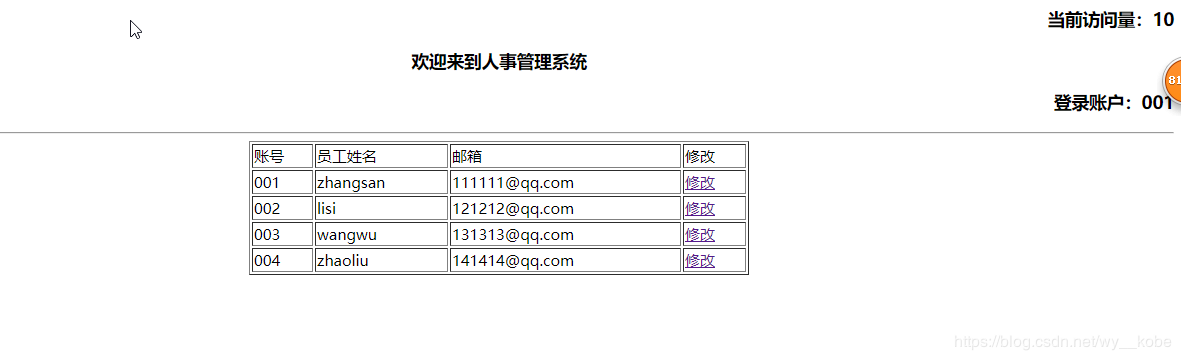
index-control.jsp 登录界面的控制界面,用于处理用户登录信息是否与map集合中的员工信息匹配
<%--
 created by intellij idea.
 user: wangy
 date: 2018/11/8
 time: 9:09
 to change this template use file | settings | file templates.
--%>
<%@ page contenttype="text/html;charset=utf-8" language="java" errorpage="error.jsp" %>
<%@ page import="org.wang.db.*,org.wang.model.*" %>
<%@ page import="java.util.map" %>
<html>
<head>
 <title>人事管理系统</title>
</head>
<body>
 <%--获取用户输入的账号及密码,并调用dbutil中的方法判断信息是否存在
 request:获取请求信息
 request.getparameter(string name):可以通过一个控件的name属性来获取控件的值
 out.println(); 向页面输出信息
 --%>
 <%
 // 获取用户输入的账号及密码
 string account = request.getparameter("account");
 string password = request.getparameter("password");

 //将用户输入的账号和密码封装到一个emp对象中
 emp emp = new emp(account,null,password,null);
 boolean flag = dbutil.selectempbyaccountandpassword(emp);

 //获取map集合
 map<string,emp> map = dbutil.map;
 if(flag==true){
 //设置session
 session.setattribute("account",account);
 //使用application来获取系统访问量
 object o = application.getattribute("count");
 //判断如果当前用户为第一个登录,则application中的值为空,此时将访问量设置为1
 if(o == null){
 application.setattribute("count",1);
 }else{
 //count原来为string,强转为int型,并做+1操作
 int count = integer.parseint(o.tostring());
 application.setattribute("count",count+1);
 }
 %>
 <%--获取访问量并显示到页面上--%>
 <h3 align="right">当前访问量:<%=application.getattribute("count")%></h3>
 <%--获取session中的值并显示到页面上--%>
 <h3 align="center">欢迎来到人事管理系统</h3>
 <h3 align="right">登录账户:<%=session.getattribute("account")%></h3>
 <hr>
 <table align="center" border="1" width="500px">
 <tr>
 <td>
 账号
 </td>
 <td>
 员工姓名
 </td>
 <td>
 邮箱
 </td>
 <td>
 修改
 </td>
 </tr>
 <%--用for循环自动根据模拟数据库中的数据生成单元行,显示出员工信息表--%>
 <%
 for (string key : map.keyset()){
 emp e = map.get(key);
 %>
 <tr>
 <td>
 <%=e.getaccount()%>
 </td>
 <td>
 <%=e.getname()%>
 </td>
 <td>
 <%=e.getemail()%>
 </td>
 <td>
 <%--点击修改跳转到update.jsp页面,采用url方式传递参数,地址栏会显示数据信息--%>
 <%--相邻两个jsp页面传递数据时,可通过url参数的方式传递--%>
  <%--语法规则:页面?key1=value1 & key2=value2--%>
 <a href="update.jsp?account=<%=e.getaccount()%>&name=<%=e.getname()%>&email=<%=e.getemail()%>" rel="external nofollow" >修改</a>
 </td>
 </tr>
 <%
 }
 %>
 </table>
 <%
 }else{
 throw new exception("登录失败");
 }
 %>

</body>
</html>
error.jsp
<%--
 created by intellij idea.
 user: wangy
 date: 2018/11/8
 time: 16:01
 to change this template use file | settings | file templates.
--%>
<%@ page contenttype="text/html;charset=utf-8" language="java" iserrorpage="true" %>
<html>
<head>
 <title>title</title>
</head>
<body>
 <%=exception.getmessage()%>
</body>
</html>
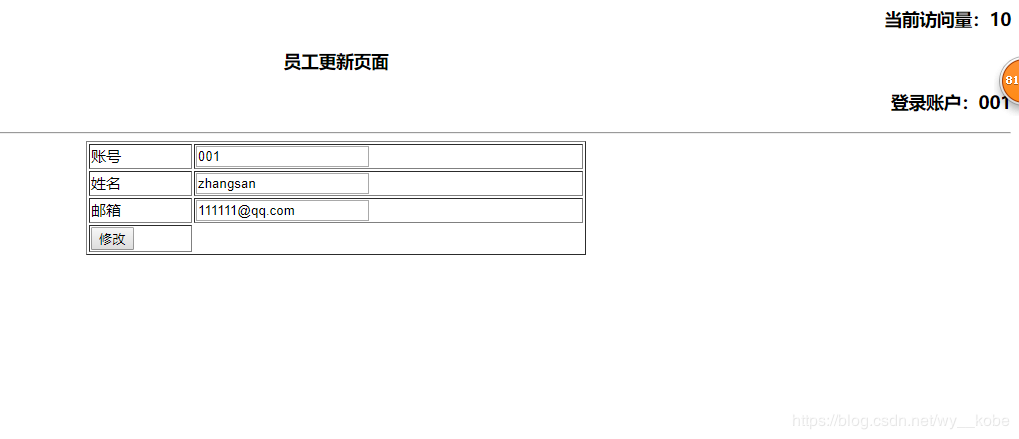
update.jsp 修改员工信息页面
%--
 created by intellij idea.
 user: wangy
 date: 2018/11/8
 time: 15:27
 to change this template use file | settings | file templates.
--%>
<%@ page contenttype="text/html;charset=utf-8" language="java" %>
<html>
<head>
 <title>员工更新页面</title>
</head>
<body>
 <h3 align="right">当前访问量:<%=application.getattribute("count")%></h3>
 <h3 align="center">员工更新页面</h3>
 <%--获取session中的值并显示到页面上--%>
 <h3 align="right">登录账户:<%=session.getattribute("account")%></h3>
 <hr>
 <form action="update-control.jsp">
 <table align="center" border="1" width="500px">
 <tr>
 <%--value="<%=request.getparameter("account")%>"可用于实现数据的回显--%>
 <td>账号</td>
 <td><input type="text" name="account" value="<%=request.getparameter("account")%>"></td>
 </tr>
 <tr>
 <td>姓名</td>
 <td><input type="text" name="name" value="<%=request.getparameter("name")%>"></td>
 </tr>
 <tr>
 <td>邮箱</td>
 <td><input type="text" name="email" value="<%=request.getparameter("email")%>"></td>
 </tr>
 <tr>
 <td>
  <input type="submit" value="修改">
 </td>
 </tr>
 </table>
 </form>
</body>
</html>
update-control 执行修改操作的控制页面
<%--
 created by intellij idea.
 user: wangy
 date: 2018/11/9
 time: 9:46
 to change this template use file | settings | file templates.
--%>
<%@ page contenttype="text/html;charset=utf-8" language="java" %>
<%@page import="org.wang.db.*,org.wang.model.*" %>
<%@ page import="java.util.map" %>
<html>
<head>
 <title>title</title>
</head>
<body>
 <%
 //获取map集合
 map<string,emp> map = dbutil.map;
 //修改信息
 //获取当前需要修改的员工的account
 emp emp = map.get(request.getparameter("account"));
 //把获取到的当前员工的信息重新set
 emp.setname(request.getparameter("name"));
 emp.setemail(request.getparameter("email"));
 %>
 <h3 align="center">修改员工信息成功</h3>
</body>
</html>
运行效果
登录界面
登录成功后进入员工信息显示页面
修改员工信息(这里用了数据回显)
以上就是本文的全部内容,希望对大家的学习有所帮助,也希望大家多多支持硕编程。
相关文章
- jsp+servlet实现文件上传与下载功能
- EJB3.0部署消息驱动Bean抛javax.naming.NameNotFoundException异常
- 在JSP中使用formatNumber控制要显示的小数位数方法
- 秒杀系统Web层设计的实现方法
- 将properties文件的配置设置为整个Web应用的全局变量实现方法
- JSP使用过滤器防止Xss漏洞
- 在JSP页面中动态生成图片验证码的方法实例
- 详解JSP 内置对象request常见用法
- 使用IDEA编写jsp时EL表达式不起作用的问题及解决方法
- jsp实现局部刷新页面、异步加载页面的方法
- Jsp中request的3个基础实践
- JavaServlet的文件上传和下载实现方法
- JSP页面的静态包含和动态包含使用方法
 JSP技巧
JSP技巧