


JSP中param动作的实例详解
jsp中param动作的实例详解
一 语法
<jsp:param name="参数名" value="参数值">
常常与<jsp:forward>一起使用,作为其子标签存在。
二 代码
1、login.jsp
<%@ page language="java" import="java.util.*" contenttype="text/html; charset=utf-8" %>
<%
string path = request.getcontextpath();
string basepath = request.getscheme()+"://"+request.getservername()+":"+request.getserverport()+path+"/";
%>

<!doctype html public "-//w3c//dtd html 4.01 transitional//en">
<html>
 <head>
  <base href="<%=basepath%>" rel="external nofollow" rel="external nofollow" rel="external nofollow" >

  <title>my jsp 'login.jsp' starting page</title>

    <meta http-equiv="pragma" content="no-cache">
    <meta http-equiv="cache-control" content="no-cache">
    <meta http-equiv="expires" content="0">
    <meta http-equiv="keywords" content="keyword1,keyword2,keyword3">
    <meta http-equiv="description" content="this is my page">
    <!--
    <link rel="stylesheet" type="text/css" href="styles.css" rel="external nofollow" rel="external nofollow" rel="external nofollow" >
    -->

 </head>

 <body>
  <h1>系统登录</h1>
  <hr>
  <form name="loginform" action="dologin.jsp" method="post">
   <table>
    <tr>
     <td>用户名:</td>
     <td><input type="text" name="username"/></td>
    </tr>
    <tr>
     <td>密码:</td>
     <td><input type="password" name="password"/></td>
    </tr>
    <tr>
     <td colspan="2"><input type="submit" value="登录"/></td>
    </tr>
   </table>
  </form>
 </body>
</html>
2、dologin.jsp
<%@ page language="java" import="java.util.*" contenttype="text/html; charset=utf-8"%>
<%
string path = request.getcontextpath();
string basepath = request.getscheme()+"://"+request.getservername()+":"+request.getserverport()+path+"/";
%>

<!doctype html public "-//w3c//dtd html 4.01 transitional//en">
<html>
 <head>
  <base href="<%=basepath%>" rel="external nofollow" rel="external nofollow" rel="external nofollow" >

  <title>my jsp 'dologin.jsp' starting page</title>

    <meta http-equiv="pragma" content="no-cache">
    <meta http-equiv="cache-control" content="no-cache">
    <meta http-equiv="expires" content="0">
    <meta http-equiv="keywords" content="keyword1,keyword2,keyword3">
    <meta http-equiv="description" content="this is my page">
    <!--
    <link rel="stylesheet" type="text/css" href="styles.css" rel="external nofollow" rel="external nofollow" rel="external nofollow" >
    -->

 </head>

 <body>
  <jsp:forward page="user.jsp">
   <jsp:param value="admin@123.net" name="email"/>
   <jsp:param value="888888" name="password"/>
  </jsp:forward>
 </body>
</html>
3、user.jsp
<%@ page language="java" import="java.util.*" contenttype="text/html; charset=utf-8"%>
<%
string path = request.getcontextpath();
string basepath = request.getscheme()+"://"+request.getservername()+":"+request.getserverport()+path+"/";
%>

<!doctype html public "-//w3c//dtd html 4.01 transitional//en">
<html>
 <head>
  <base href="<%=basepath%>" rel="external nofollow" rel="external nofollow" rel="external nofollow" >

  <title>my jsp 'user.jsp' starting page</title>

    <meta http-equiv="pragma" content="no-cache">
    <meta http-equiv="cache-control" content="no-cache">
    <meta http-equiv="expires" content="0">
    <meta http-equiv="keywords" content="keyword1,keyword2,keyword3">
    <meta http-equiv="description" content="this is my page">
    <!--
    <link rel="stylesheet" type="text/css" href="styles.css" rel="external nofollow" rel="external nofollow" rel="external nofollow" >
    -->

 </head>

 <body>
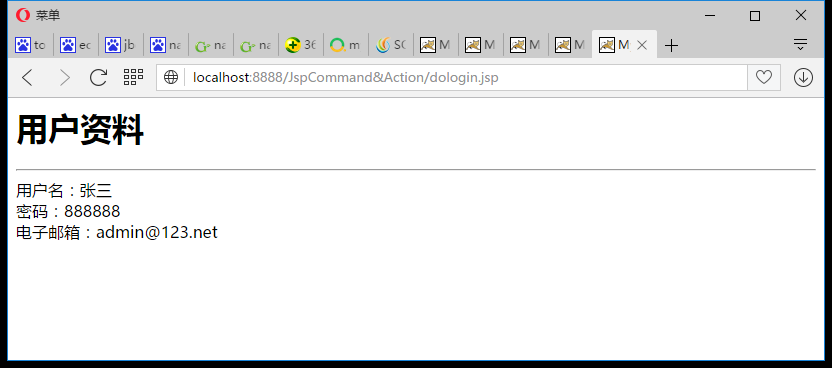
  <h1>用户资料</h1>
  <hr>
  <%
    request.setcharacterencoding("utf-8");
    string username = "";
    string password = "";
    string email = "";
    if(request.getparameter("username")!=null)
    {
     username = request.getparameter("username");
    }
    if(request.getparameter("password")!=null)
    {
     password = request.getparameter("password");
    }
    if(request.getparameter("email")!=null)
    {
     email = request.getparameter("email");
    }

  %>
    用户名:<%=username %><br>
    密码:<%=password %><br>
    电子邮箱:<%=email %><br>
 </body>
</html>
三 运行结果
如有疑问请留言或者到本站社区交流讨论,感谢阅读,希望能帮助到大家,谢谢大家对本站的支持!
相关文章
- jsp+servlet实现文件上传与下载功能
- EJB3.0部署消息驱动Bean抛javax.naming.NameNotFoundException异常
- 在JSP中使用formatNumber控制要显示的小数位数方法
- 秒杀系统Web层设计的实现方法
- 将properties文件的配置设置为整个Web应用的全局变量实现方法
- JSP使用过滤器防止Xss漏洞
- 在JSP页面中动态生成图片验证码的方法实例
- 详解JSP 内置对象request常见用法
- 使用IDEA编写jsp时EL表达式不起作用的问题及解决方法
- jsp实现局部刷新页面、异步加载页面的方法
- Jsp中request的3个基础实践
- JavaServlet的文件上传和下载实现方法
- JSP页面的静态包含和动态包含使用方法
 JSP技巧
JSP技巧